Reference implementation

Kotlin UI Kit + Calls + push (message grouping, inline replies, ConnectionService).

What this guide covers

  • FCM setup and CometChat provider wiring (credentials + Gradle + manifest).
  • Token registration/unregistration so CometChat routes pushes correctly.
  • Message notifications with grouping, avatars, inline replies; call pushes via ConnectionService.
  • Deep links/navigation from notifications and payload customization.

What you need first

  • Firebase project with an Android app added, google-services.json downloaded, and Cloud Messaging enabled.
  • CometChat App ID, Region, Auth Key; Push Notifications enabled with an FCM Android provider and its Provider ID.
  • Android device with Play Services (sample uses minSdk 26 because of ConnectionService).
  • Latest CometChat UI Kit + Calls SDK dependencies (see Gradle tabs below).

How FCM and CometChat fit together

  • Why FCM? Google issues device tokens and delivers raw push payloads to Android. You must add google-services.json, the Messaging SDK, and a service receiver (FCMService) so the device can receive pushes.
  • Why a CometChat provider? The Provider ID tells CometChat which FCM credentials to use when sending to your app. Without registering tokens against this ID, CometChat cannot target your device.
  • Token registration bridge: The app retrieves the FCM token and calls CometChatNotifications.registerPushToken(pushToken, PushPlatforms.FCM_ANDROID, providerId, …). That binds the token to your logged-in user so CometChat can route message/call pushes to FCM on your behalf.
  • Payload handling: When FCM delivers a push, your FCMService/FCMMessageBroadcastReceiver parses CometChat’s payload, shows notifications (grouped, inline reply), and forwards intents to your activities. For calls, CometChatVoIPConnectionService surfaces a telecom-grade UI and uses the same payload to accept/reject server-side.
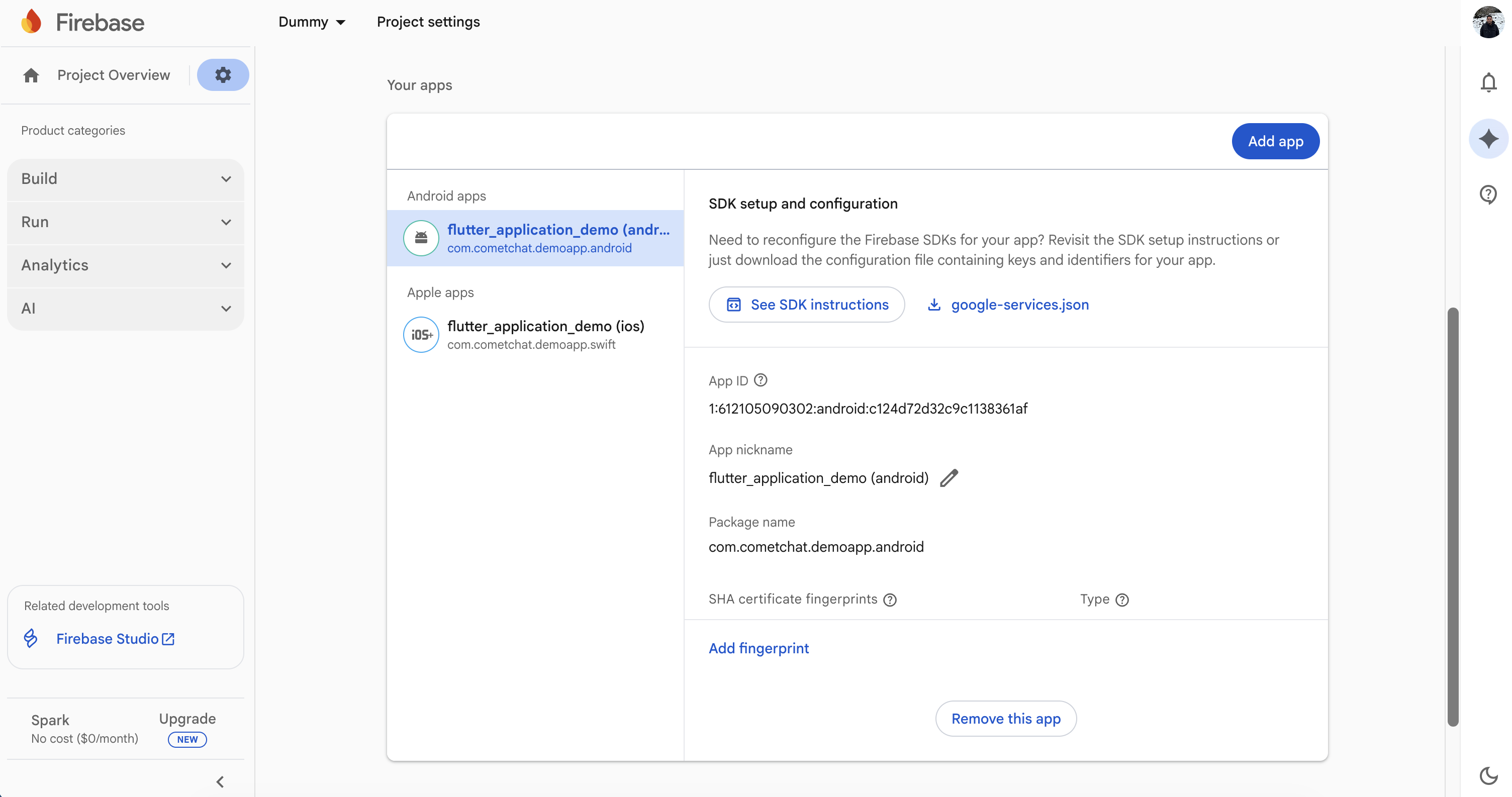
  • Dashboard ↔ app contract: The Provider ID in AppConstants.FCMConstants.PROVIDER_ID must match the dashboard provider you created. The package name in Firebase and the applicationId in Gradle must match, or FCM will reject the token.

1. Prepare Firebase and CometChat

  1. Firebase Console: Add your Android package, download google-services.json into the app module, and enable Cloud Messaging.
Firebase - Push Notifications
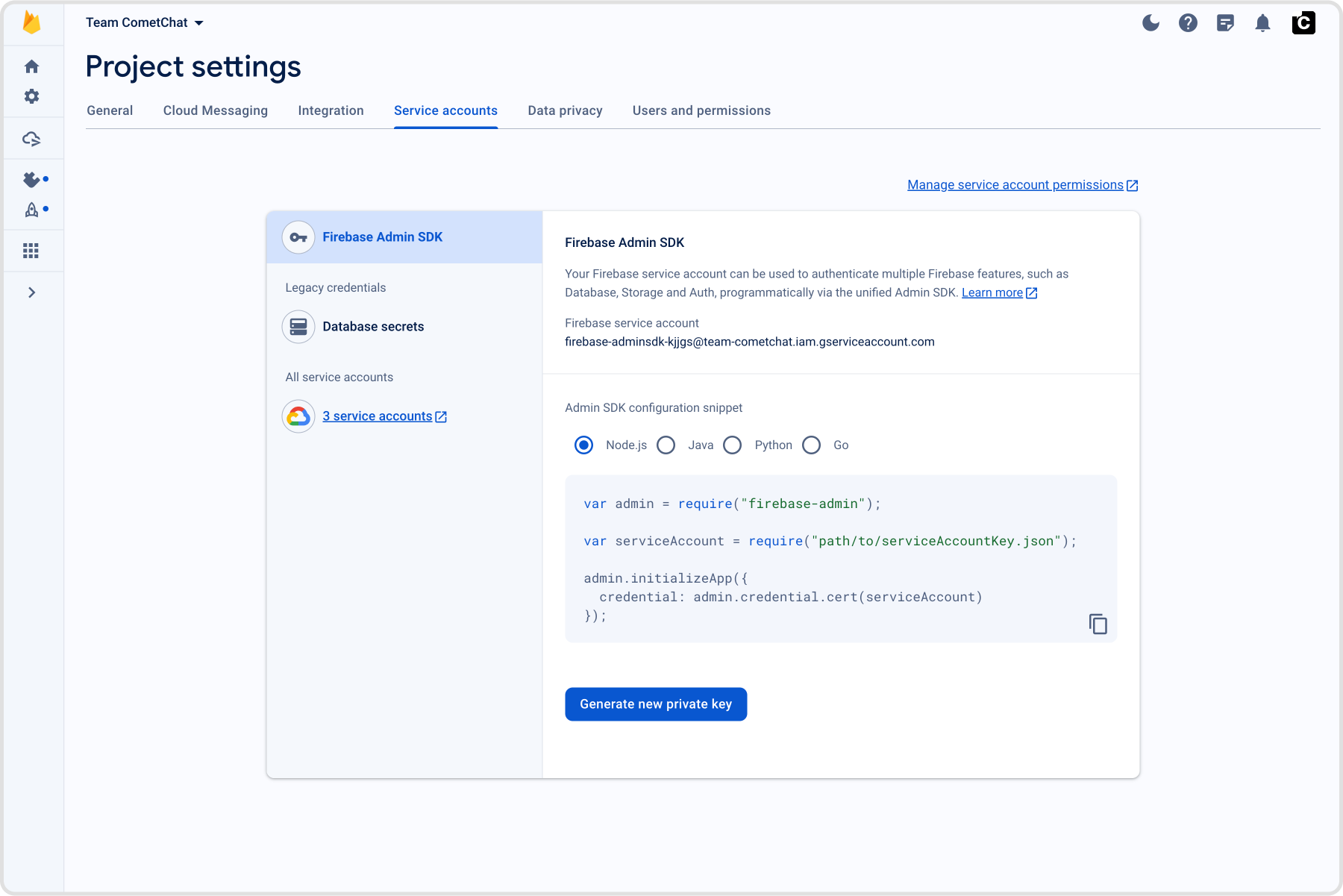
  1. CometChat dashboard: Go to Notifications → Settings, enable Push Notifications, click Add Credentials (FCM), upload the Firebase service account JSON (Project settings → Service accounts → Generate new private key), and copy the Provider ID.
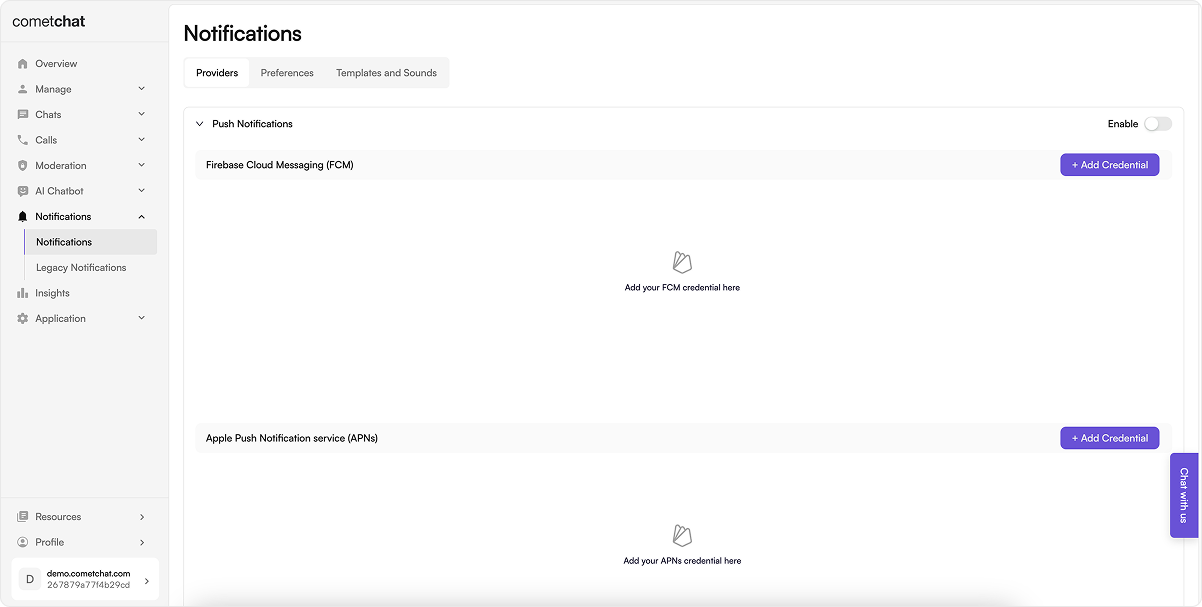
Enable Push Notifications
From the same screen, click Add Provider to upload the Firebase service account JSON. This is how you can Generate a new private key from Firebase:
Upload FCM service account JSON
  1. App constants: Note down your CometChat App ID, Auth Key, and Region from the CometChat dashboard and keep them available to be added to your project’s AppCrendentials.kt. Similarly, note the FCM Provider ID generated in the CometChat dashboard and add the same in your AppConstants.kt; this will be when registering the FCM token with CometChat.

2. Add dependencies (Gradle)

Use a version catalog and aliases (Update applicationId, package names, icons, and app name.). Also, if you are new to CometChat, please review the Maven repositories and related setup requirements before proceeding.
[versions]
minSdk = "26"
compileSdk = "35"
targetSdk = "35"
agp = "8.7.0"
kotlin = "2.0.0"
googleServices = "4.4.2"
cometChatUikit = "5.2.6"
cometChatSdk = "4.1.8"
cometChatCalls = "4.3.2"
firebaseBom = "33.7.0"
coreKtx = "1.13.1"
appcompat = "1.7.0"
material = "1.12.0"
gson = "2.11.0"
glide = "4.16.0"

[libraries]
cometchat-uikit = { group = "com.cometchat", name = "chat-uikit", version.ref = "cometChatUikit" }
cometchat-sdk = { group = "com.cometchat", name = "chat-sdk-android", version.ref = "cometChatSdk" }
cometchat-calls = { group = "com.cometchat", name = "calls-sdk-android", version.ref = "cometChatCalls" }
firebase-bom = { group = "com.google.firebase", name = "firebase-bom", version.ref = "firebaseBom" }
firebase-messaging = { group = "com.google.firebase", name = "firebase-messaging" }
firebase-auth = { group = "com.google.firebase", name = "firebase-auth" }
androidx-core-ktx = { group = "androidx.core", name = "core-ktx", version.ref = "coreKtx" }
androidx-appcompat = { group = "androidx.appcompat", name = "appcompat", version.ref = "appcompat" }
material = { group = "com.google.android.material", name = "material", version.ref = "material" }
gson = { group = "com.google.code.gson", name = "gson", version.ref = "gson" }
glide = { group = "com.github.bumptech.glide", name = "glide", version.ref = "glide" }

[plugins]
android-application = { id = "com.android.application", version.ref = "agp" }
kotlin-android = { id = "org.jetbrains.kotlin.android", version.ref = "kotlin" }
google-services = { id = "com.google.gms.google-services", version.ref = "googleServices" }
This catalog pins SDK/Gradle/Google Services versions and exposes aliases so the app/build.gradle stays short and consistent with the sample.
  • Apply the google-services plugin and place google-services.json in the same module; keep viewBinding enabled if you copy UI Kit screens directly from the sample. The Groovy snippet consumes the catalog aliases and pulls UI Kit, Calls, and FCM dependencies through the BOM.

3. Manifest permissions and services

Start from the sample AndroidManifest.xml:
<uses-permission android:name="android.permission.INTERNET" />
<uses-permission android:name="android.permission.POST_NOTIFICATIONS" />
<!-- VoIP -->
<uses-permission android:name="android.permission.ACCESS_NETWORK_STATE" />
<uses-permission android:name="android.permission.READ_PHONE_STATE" />
<uses-permission android:name="android.permission.RECORD_AUDIO" />
<uses-permission android:name="android.permission.CALL_PHONE" />
<uses-permission android:name="android.permission.MANAGE_OWN_CALLS" />
<uses-permission android:name="android.permission.WAKE_LOCK" />
<uses-permission android:name="android.permission.ANSWER_PHONE_CALLS" />
<uses-feature android:name="android.hardware.sensor.proximity" android:required="false" />
<uses-feature android:name="android.hardware.telephony" android:required="false" />

<application
    android:name=".fcm.utils.MyApplication"
    ...>

    <service
        android:name=".fcm.fcm.FCMService"
        android:exported="false">
        <intent-filter>
            <action android:name="com.google.firebase.MESSAGING_EVENT" />
        </intent-filter>
    </service>

    <receiver android:name=".fcm.fcm.FCMMessageBroadcastReceiver" />

    <service
        android:name=".fcm.voip.CometChatVoIPConnectionService"
        android:exported="true"
        android:permission="android.permission.BIND_TELECOM_CONNECTION_SERVICE">
        <intent-filter>
            <action android:name="android.telecom.ConnectionService" />
        </intent-filter>
    </service>
</application>
  • Permissions cover notifications + telecom; services/receiver wire Firebase delivery (FCMService), notification actions (FCMMessageBroadcastReceiver), and telecom UI (CometChatVoIPConnectionService). Point android:name to your MyApplication.
  • Set android:name on <application> to your MyApplication subclass.
  • Keep runtime permission prompts for notifications, mic, camera, and media access (see AppUtils.kt / HomeActivity.kt in the sample).

4. Application wiring, sample code, and callbacks

  • Clone/open the reference repo.
  • Copy into your app module (keep structure):
    • fcm/fcm for services/DTOs/notification utils/broadcast receiver.
    • fcm/voip for ConnectionService + VoIP helpers.
    • fcm/utils for MyApplication, AppUtils, AppConstants, AppCredentials.
    • Copy String values from res/values/strings.xml.
    • BuildConfig file build.gradle.
  • Update packages to your namespace; set AppCredentials (App ID/Auth Key/Region) and AppConstants.FCMConstants.PROVIDER_ID to your dashboard provider. Point <application android:name> and services/receivers to your package; update app name/icons as needed.
  • Keep notification constants from AppConstants.kt; rename channels/keys consistently if you change them.
Splash/entry deep link handler (adapt activity targets):
// In your Splash/entry activity (e.g., SplashActivity)
override fun onCreate(savedInstanceState: Bundle?) {
    super.onCreate(savedInstanceState)
    handleDeepLinking()
}

private fun handleDeepLinking() {
    NotificationManagerCompat.from(this)
        .cancel(AppConstants.FCMConstants.NOTIFICATION_GROUP_SUMMARY_ID)

    val notificationType = intent.getStringExtra(AppConstants.FCMConstants.NOTIFICATION_TYPE)
    val notificationPayload = intent.getStringExtra(AppConstants.FCMConstants.NOTIFICATION_PAYLOAD)

    startActivity(
        Intent(this, HomeActivity::class.java).apply {
            putExtra(AppConstants.FCMConstants.NOTIFICATION_TYPE, notificationType)
            putExtra(AppConstants.FCMConstants.NOTIFICATION_PAYLOAD, notificationPayload)
        }
    )
    finish()
}
This reads the push extras, clears the summary notification, and forwards the payload to HomeActivity so taps or deep links land in the right screen. What the core pieces do
  • FCMService – receives FCM data/notification messages, parses CometChat payload, and hands off to FCMMessageBroadcastReceiver.
  • FCMMessageBroadcastReceiver – builds grouped notifications, inline reply actions, and routes taps/deeplinks to your HomeActivity.
  • Repository.registerFCMToken – fetches the FCM token and registers it with CometChat using AppConstants.FCMConstants.PROVIDER_ID; call after login.
  • Repository.acceptCall/rejectCall/rejectCallWithBusyStatus – performs server-side call actions so the caller sees the correct state even if your UI is backgrounded.
  • MyApplication – initializes UIKit, manages websocket connect/disconnect, tracks foreground state, and shows/dismisses incoming call overlays.
  • CometChatVoIPConnectionService – handles Android telecom integration so call pushes display a system-grade incoming call UI and cleanly end/busy on reject.
SplashViewModel (init UIKit + login check)
class SplashViewModel : ViewModel() {
    private val loginStatus = MutableLiveData<Boolean>()

    fun initUIKit(context: Context) {
        val appId = AppUtils.getDataFromSharedPref(context, String::class.java, R.string.app_cred_id, AppCredentials.APP_ID)
        val region = AppUtils.getDataFromSharedPref(context, String::class.java, R.string.app_cred_region, AppCredentials.REGION)
        val authKey = AppUtils.getDataFromSharedPref(context, String::class.java, R.string.app_cred_auth, AppCredentials.AUTH_KEY)

        val uiKitSettings = UIKitSettings.UIKitSettingsBuilder()
            .setAutoEstablishSocketConnection(false)
            .setAppId(appId)
            .setRegion(region)
            .setAuthKey(authKey)
            .subscribePresenceForAllUsers()
            .build()

        CometChatUIKit.init(context, uiKitSettings, object : CometChat.CallbackListener<String>() {
            override fun onSuccess(s: String) {
                CometChat.setDemoMetaInfo(getAppMetadata(context))
                checkUserIsNotLoggedIn()
            }
            override fun onError(e: CometChatException) {
                Toast.makeText(context, e.message, Toast.LENGTH_SHORT).show()
            }
        })
    }

    private fun getAppMetadata(context: Context): JSONObject {
        val jsonObject = JSONObject()
        jsonObject.put("name", context.getString(R.string.app_name))
        jsonObject.put("bundle", BuildConfig.APPLICATION_ID)
        jsonObject.put("version", BuildConfig.VERSION_NAME)
        jsonObject.put("platform", "android")
        return jsonObject
    }

    fun checkUserIsNotLoggedIn() {
        loginStatus.value = CometChatUIKit.getLoggedInUser() != null
    }

    fun getLoginStatus(): LiveData<Boolean> = loginStatus
}
Loads credentials from shared prefs, builds UIKitSettings, initializes CometChat UIKit (without auto socket), sets sample metadata, and exposes loginStatus so the splash can route to login vs home. Repository (push token + call helpers)
object Repository {
    fun registerFCMToken(listener: CometChat.CallbackListener<String>) { /* fetch FCM token and call registerPushToken */ }
    fun unregisterFCMToken(listener: CometChat.CallbackListener<String>) { /* call unregisterPushToken */ }

    fun rejectCallWithBusyStatus(
        call: Call,
        callbackListener: CometChat.CallbackListener<Call>? = null
    ) { /* reject with CALL_STATUS_BUSY and notify UIKit */ }

    fun acceptCall(
        call: Call,
        callbackListener: CometChat.CallbackListener<Call>
    ) { /* acceptCall and notify UIKit */ }

    fun rejectCall(
        call: Call,
        callbackListener: CometChat.CallbackListener<Call>
    ) { /* rejectCall with CALL_STATUS_REJECTED and notify UIKit */ }
}
Thin wrappers that register/unregister FCM tokens with your Provider ID and perform server-side call actions (accept/reject/busy) so the caller sees the correct state even if your UI is backgrounded. MyApplication (push/call lifecycle essentials)
class MyApplication : Application() {
    override fun onCreate() {
        super.onCreate()

        if (!CometChatUIKit.isSDKInitialized()) {
            SplashViewModel().initUIKit(this)
        }

        FirebaseApp.initializeApp(this)
        addCallListener()
        registerActivityLifecycleCallbacks(object : ActivityLifecycleCallbacks {
            override fun onActivityCreated(activity: Activity, savedInstanceState: Bundle?) { currentActivity = activity }
            override fun onActivityStarted(activity: Activity) {
                if (activity !is SplashActivity &&
                    CometChatUIKit.isSDKInitialized() &&
                    isConnectedToWebSockets.compareAndSet(false, true)
                ) {
                    CometChat.connect(object : CometChat.CallbackListener<String?>() {
                        override fun onSuccess(s: String?) { isConnectedToWebSockets.set(true) }
                        override fun onError(e: CometChatException) { isConnectedToWebSockets.set(false) }
                    })
                }
                currentActivity = activity
                if (++activityReferences == 1 && !isActivityChangingConfigurations) {
                    isAppInForeground = true
                }
            }
            override fun onActivityResumed(activity: Activity) { currentActivity = activity }
            override fun onActivityPaused(activity: Activity) {}
            override fun onActivityStopped(activity: Activity) {
                if (activity !is SplashActivity) {
                    isActivityChangingConfigurations = activity.isChangingConfigurations
                    if (--activityReferences == 0 && !isActivityChangingConfigurations) {
                        isAppInForeground = false
                        if (CometChatUIKit.isSDKInitialized()) {
                            CometChat.disconnect(object : CometChat.CallbackListener<String?>() {
                                override fun onSuccess(s: String?) { isConnectedToWebSockets.set(false) }
                                override fun onError(e: CometChatException) {}
                            })
                        }
                    }
                }
            }
            override fun onActivitySaveInstanceState(activity: Activity, outState: Bundle) {}
            override fun onActivityDestroyed(activity: Activity) { if (currentActivity === activity) currentActivity = null }
        })
    }

    private fun addCallListener() {
        CometChat.addCallListener(LISTENER_ID, object : CometChat.CallListener() {
            override fun onIncomingCallReceived(call: Call) { /* handle call UI or banner */ }
            override fun onOutgoingCallAccepted(call: Call) {}
            override fun onOutgoingCallRejected(call: Call) {}
            override fun onIncomingCallCancelled(call: Call) {}
            override fun onCallEndedMessageReceived(call: Call) {}
        })
    }

    companion object {
        var currentOpenChatId: String? = null
        var currentActivity: Activity? = null
        private var isAppInForeground = false
        private val isConnectedToWebSockets = AtomicBoolean(false)
        private var activityReferences = 0
        private var isActivityChangingConfigurations = false
        private var LISTENER_ID: String = System.currentTimeMillis().toString()
        private var tempCall: Call? = null

        fun getTempCall(): Call? = tempCall
        fun setTempCall(call: Call?) {
            tempCall = call
            if (call == null && soundManager != null) {
                soundManager?.pauseSilently()
            }
        }

        fun isAppInForeground(): Boolean = isAppInForeground
        var soundManager: CometChatSoundManager? = null
    }
}
Initializes UIKit/Firebase, adds call listeners, manages websocket connect/disconnect tied to app foreground, tracks the current activity, and caches temp call state so banners can reappear after resume. State to set at runtime:
  • isAppInForeground/currentActivity inside lifecycle callbacks.
  • currentOpenChatId when a chat screen opens; clear on exit to suppress notifications only for the active chat.
  • tempCall via setTempCall(...) when an incoming call arrives; clear on dismiss/end. getTempCall() is read on resume to re-show the banner.

5. Application wiring and permissions

  • AppUtils.kt + your entry screen (e.g., HomeActivity): request notification/mic/camera/storage permissions early.
  • In HomeActivity, keep the VoIP permission chain and phone-account enablement so call pushes can render the native UI:
override fun onCreate(savedInstanceState: Bundle?) {
    super.onCreate(savedInstanceState)
    AppUtils.requestNotificationPermission(this)
    configureVoIP()
    handleDeepLinking() // open chats based on NOTIFICATION_TYPE/NOTIFICATION_PAYLOAD
}

private fun configureVoIP() {
    CometChatVoIP.init(this, applicationInfo.loadLabel(packageManager).toString())
    launchVoIP()
}

private fun launchVoIP() {
    if (!CometChatVoIP.hasReadPhoneStatePermission(this)) {
        CometChatVoIP.requestReadPhoneStatePermission(this, CometChatVoIPConstant.PermissionCode.READ_PHONE_STATE)
        return
    }
    if (!CometChatVoIP.hasManageOwnCallsPermission(this)) {
        CometChatVoIP.requestManageOwnCallsPermission(this, CometChatVoIPConstant.PermissionCode.MANAGE_OWN_CALLS)
        return
    }
    if (!CometChatVoIP.hasAnswerPhoneCallsPermission(this)) {
        CometChatVoIP.requestAnswerPhoneCallsPermission(this, CometChatVoIPConstant.PermissionCode.ANSWER_PHONE_CALLS)
        return
    }
    CometChatVoIP.hasEnabledPhoneAccountForVoIP(this, object : VoIPPermissionListener {
        override fun onPermissionsGranted() { /* ready for call pushes */ }
        override fun onPermissionsDenied(error: CometChatVoIPError?) {
            CometChatVoIP.alertDialogForVoIP(this@HomeActivity)
        }
    })
}

override fun onRequestPermissionsResult(reqCode: Int, permissions: Array<String>, results: IntArray) {
    super.onRequestPermissionsResult(reqCode, permissions, results)
    when (reqCode) {
        AppUtils.PushNotificationPermissionCode -> if (granted(results)) {
            CometChatVoIP.requestPhoneStatePermissions(this, CometChatVoIPConstant.PermissionCode.READ_PHONE_STATE)
        }
        CometChatVoIPConstant.PermissionCode.READ_PHONE_STATE -> if (granted(results)) {
            if (CometChatVoIP.hasManageOwnCallsPermission(this)) {
                CometChatVoIP.requestAnswerPhoneCallsPermissions(this, CometChatVoIPConstant.PermissionCode.ANSWER_PHONE_CALLS)
            } else {
                CometChatVoIP.requestManageOwnCallsPermissions(this, CometChatVoIPConstant.PermissionCode.MANAGE_OWN_CALLS)
            }
        }
        CometChatVoIPConstant.PermissionCode.MANAGE_OWN_CALLS -> if (granted(results)) {
            CometChatVoIP.requestAnswerPhoneCallsPermissions(this, CometChatVoIPConstant.PermissionCode.ANSWER_PHONE_CALLS)
        }
        CometChatVoIPConstant.PermissionCode.ANSWER_PHONE_CALLS -> if (granted(results)) {
            launchVoIP()
        }
    }
}

private fun granted(results: IntArray) =
    results.isNotEmpty() && results[0] == PackageManager.PERMISSION_GRANTED

// Deep link from notification payload to Chats
private fun handleDeepLinking() {
    val type = intent.getStringExtra(AppConstants.FCMConstants.NOTIFICATION_TYPE)
    val payload = intent.getStringExtra(AppConstants.FCMConstants.NOTIFICATION_PAYLOAD) ?: return
    if (type == AppConstants.FCMConstants.NOTIFICATION_TYPE_MESSAGE) {
        val fcmMessageDTO = Gson().fromJson(payload, FCMMessageDTO::class.java)
        // Set currentOpenChatId to suppress notifications for the open chat
        MyApplication.currentOpenChatId = if (fcmMessageDTO.receiverType == "user") {
            fcmMessageDTO.sender
        } else fcmMessageDTO.receiver
    }
}
Requests notification + telecom permissions in sequence, initializes the VoIP phone account, and maps notification payload extras to set currentOpenChatId so you don’t alert for the chat currently open.

6. Register the FCM token after login

Call registration right after CometChatUIKit.login() succeeds:
FirebaseMessaging.getInstance().token.addOnCompleteListener { task ->
    if (task.isSuccessful) {
        val token = task.result
        CometChatNotifications.registerPushToken(
            token,
            PushPlatforms.FCM_ANDROID,
            AppConstants.FCMConstants.PROVIDER_ID,
            object : CometChat.CallbackListener<String?>() {
                override fun onSuccess(uid: String?) { /* token registered */ }
                override fun onError(e: CometChatException) { /* handle failure */ }
            }
        )
    }
}
Registers the current device token with CometChat under your Provider ID after login so the backend can target this user via FCM; retry on failure and rerun when the token rotates. Re-register on token refresh. Keep the provider ID aligned to the FCM provider you created for this app. Handle FCM refresh tokens too:
// In FCMService
override fun onNewToken(token: String) {
    super.onNewToken(token)
    // Re-register with CometChat using your provider ID
    CometChatNotifications.registerPushToken(
        token,
        PushPlatforms.FCM_ANDROID,
        AppConstants.FCMConstants.PROVIDER_ID,
        object : CometChat.CallbackListener<String?>() {
            override fun onSuccess(s: String?) { /* token registered */ }
            override fun onError(e: CometChatException) { /* handle failure */ }
        }
    )
}
Ensures a rotated FCM token is re-bound to the logged-in user; without this, pushes will stop after Firebase refreshes the token.

7. Unregister the token on logout

CometChatNotifications.unregisterPushToken(object : CometChat.CallbackListener<String?>() {
    override fun onSuccess(s: String?) { /* success */ }
    override fun onError(e: CometChatException) { /* handle error */ }
})
// Then call CometChatUIKit.logout()

8. What arrives in the push payload

Payload keys delivered to onMessageReceived (adapted from the shared push integration):
{
  "title": "Andrew Joseph",
  "body": "Hello!",
  "sender": "cometchat-uid-1",
  "senderName": "Andrew Joseph",
  "senderAvatar": "https://assets.cometchat.io/sampleapp/v2/users/cometchat-uid-1.webp",
  "receiver": "cometchat-uid-2",
  "receiverName": "George Alan",
  "receiverAvatar": "https://assets.cometchat.io/sampleapp/v2/users/cometchat-uid-2.webp",
  "receiverType": "user",
  "tag": "123",
  "conversationId": "cometchat-uid-1_user_cometchat-uid-2",
  "type": "chat", // or "call"
  "callAction": "initiated", // "initiated" | "cancelled" | "unanswered" | "ongoing" | "rejected" | "ended" | "busy"
  "sessionId": "v1.123.aik2",
  "callType": "audio",
  "sentAt": "1741847453000",
  "message": { },       // CometChat Message Object if included
  "custom": { }         // Custom JSON if configured
}
Use message for deep links (CometChatHelper.processMessage) and type/callAction to branch chat vs call flows.

9. Handle message pushes

  • FCMService.onMessageReceived checks message.data["type"].
  • For type == "chat": mark delivered (CometChat.markAsDelivered), skip notifying if the chat is already open (MyApplication.currentOpenChatId), and build grouped notifications (avatars + BigText) via FCMMessageNotificationUtils with inline reply actions.
  • FCMMessageBroadcastReceiver handles inline replies, initializes the SDK headlessly, sends the reply, and refreshes the notification.
  • In your messaging service (e.g., FCMService), set the notification tap intent to your splash/entry activity (e.g., SplashActivity), and keep the currentOpenChatId check to suppress notifications for the open chat.

10. Handle call pushes (ConnectionService)

  • For type == "call", FCMService.handleCallFlow parses FCMCallDto and routes to the voip package.
  • CometChatVoIP registers a PhoneAccount and triggers TelecomManager.addNewIncomingCall for native full-screen UI with Accept/Decline.
  • Busy logic: if already on a call, reject with busy (Repository.rejectCallWithBusyStatus). Cancel/timeout pushes end the active telecom call when IDs match.
  • Runtime VoIP checks: before handling call pushes, request READ_PHONE_STATE, MANAGE_OWN_CALLS, and ANSWER_PHONE_CALLS at runtime and ensure the phone account is enabled (CometChatVoIP.hasEnabledPhoneAccountForVoIP).
  • Foreground suppression: the sample ignores VoIP banners if MyApplication.isAppInForeground() is true; keep or remove based on your UX.
  • Cancel/unanswered handling: on callAction of cancelled/unanswered, end the active telecom call if the session IDs match.

11. Customize notification text or parse payloads

Parse the push into a BaseMessage for deep links:
override fun onMessageReceived(remoteMessage: RemoteMessage) {
    val messageJson = remoteMessage.data["message"] ?: return
    val baseMessage = CometChatHelper.processMessage(JSONObject(messageJson))
    // open the right chat/thread using baseMessage
}
Parses the CometChat message JSON shipped in the payload into a BaseMessage so you can navigate to the right conversation/thread without extra API calls. Override the push body before sending:
val meta = JSONObject().put("pushNotification", "Custom notification body")
customMessage.metadata = meta
CometChat.sendCustomMessage(customMessage, object : CallbackListener<CustomMessage>() {})
Adds a pushNotification field in metadata so CometChat uses your custom text as the push body for that message.

12. Navigation from notifications

Notification taps launch SplashActivity; it reads NOTIFICATION_PAYLOAD extras and opens the correct user or group in MessagesActivity. Keep launchMode settings that allow the intent extras to arrive.

13. Testing checklist

  1. Install on a physical device and grant notification + mic permissions (Android 13+ needs POST_NOTIFICATIONS).
  2. Log in and ensure token registration succeeds (check Logcat).
  3. Send a message from another user:
    • Foreground: grouped notification shows unless you are already in that chat.
    • Background/terminated: tap opens the correct conversation.
  4. Inline reply from the shade delivers the message and updates the notification.
  5. Trigger an incoming call push:
    • Native full-screen call UI appears with caller info.
    • Accept/Decline work; cancel/timeout dismisses the telecom call.
  6. Reinstall or clear app data to confirm token re-registration works.

Troubleshooting

SymptomQuick checks
No notificationsPackage name matches Firebase app, google-services.json is present, notification permission granted, Provider ID correct, Push Notifications enabled.
Token registration failsRun registration after login, confirm AppConstants.FCMConstants.PROVIDER_ID, and verify the Firebase project matches the app ID.
Notification tap does nothingEnsure SplashActivity reads NOTIFICATION_PAYLOAD and activity launch modes do not drop extras.
Call UI never showsAll telecom permissions declared + granted; CometChatVoIPConnectionService in manifest; device supports MANAGE_OWN_CALLS.
Inline reply crashesKeep FCMMessageBroadcastReceiver registered; do not strip FCM or RemoteInput classes in ProGuard/R8.